Hire Expert Real Estate Virtual Assistants – Start $8 /hour

Boost Efficiency in Your Real Estate Business with Skilled Virtual Assistants from My Costa Rica Virtual.

Hiring a virtual real estate assistant can significantly enhance the efficiency of real estate businesses by reducing overhead costs, optimizing workflow, and freeing up time for real estate agents to focus on core activities like client engagement and closing deals.

Enhance productivity and experience seamless support with our expert Real Estate Virtual Assistants. They manage property listings, handle client inquiries, and much more, redefining operational excellence in the real estate sector.

What is a Real Estate Virtual Assistant?

A Real Estate Virtual Assistant is a remote professional who supports real estate businesses by managing various administrative duties. These include coordinating client communications, assisting with property listings, and handling paperwork, all from a remote location to boost operational efficiency.

For example, a Real Estate Virtual Assistant can:

  • Administrative support
  • Update client databases
  • Process transaction documentation
  • Manage online property listings

With these tasks handled efficiently, real estate agents can focus more on closing deals and building client relationships, while the virtual assistant takes care of the daily administrative responsibilities.

Administrative Support

Managing a real estate investment business involves a significant amount of administrative work. Virtual real estate assistants can alleviate this burden by handling tasks such as:

Managing Emails and Communication

Virtual real estate assistants can efficiently manage email correspondence, filter important messages, respond to inquiries, and organize communications in a structured manner.

Appointment Scheduling and Calendar Management

Virtual assistants help real estate investors stay organized and ensure efficient time management by managing calendars and scheduling appointments.

Data Entry and Documentation

Virtual real estate assistants can handle data entry tasks, maintaining accurate records of properties, clients, and transactions. They can also assist with document preparation and organization.

For real estate professionals, a virtual assistant for real estate not only streamlines daily operations but also adds scalability and adaptability—key advantages in responding to the ever-changing real estate market.

Marketing and Advertising Assistance

An effective marketing strategy is crucial for real estate investors to attract clients and generate leads. Virtual real estate assistants can provide valuable support in the following areas:

Social Media Management

Virtual real estate assistants can create and manage social media accounts, curate content, engage with the audience, and run targeted advertising campaigns to enhance the online presence of real estate investors.

Content Creation and Blogging

Virtual real estate assistants skilled in content creation can develop engaging blog posts, articles, and other forms of content that showcase the expertise of real estate investors and provide valuable information to potential clients.

Lead Generation and Prospecting

By conducting thorough research and utilizing various tools, virtual real estate assistants can identify potential leads and prospects, saving investors significant time and effort.

Research and Analysis

Accurate research and analysis are vital for making informed investment decisions. Virtual real estate assistants can assist in the following research-related tasks:

Market Research and Competitive Analysis

Virtual real estate assistants can gather and analyze data related to local real estate markets, identify trends, and assess the competition, providing real estate investors with valuable insights.

Property Research and Due Diligence

The best real estate virtual assistants can conduct thorough research on properties, verify details, assess the market value, and gather essential information to support investors in their decision-making process.

Financial Analysis and Reporting

Virtual assistants for real estate proficient in financial analysis can create reports, analyze investment performance, track expenses, and maintain accurate financial records.

Real estate transactions involve multiple parties and intricate processes. Virtual real estate assistants can offer essential support in the following transaction-related activities:

Contract Preparation and Management

Virtual assistants for real estate can prepare contracts, review legal documents, and ensure compliance with relevant regulations. They can also manage contract timelines and assist in negotiations.

Coordinating with Buyers, Sellers, and Agents

Virtual real estate assistants can serve as a point of contact for buyers, sellers, and real estate agents, facilitating effective communication, coordinating property showings, and addressing queries.

Follow-Up and Closing Procedures

Virtual assistants for real estate can handle post-offer follow-ups, coordinate property inspections, gather the necessary documentation, and ensure a smooth closing process.

Benefits of a Real Estate Virtual Assistant

Scalability and Adaptability

Virtual assistants enable real estate agents to expand their client base and manage more properties effectively without the need to hire additional in-house staff. This scalability allows agents to adapt quickly to market changes and client demands.

Enhanced Flexibility

Embracing the flexibility offered by virtual real estate assistants can be transformative. Virtual assistants provide the agility needed to capitalize on market trends and client needs swiftly, boosting profitability and enhancing the competitive edge in the real estate market.

Operational Efficiency

By handling administrative tasks such as scheduling property showings, updating client databases, and managing online property listings, virtual assistants free up agents to focus on closing deals and building client relationships. This strategic approach not only streamlines daily operations but also maximizes productivity and operational efficiency.

Embrace the Future of Real Estate

Integrating virtual assistants into your real estate business is a smart move towards achieving greater efficiency, scalability, and adaptability. Stay ahead in the competitive real estate market with the support of skilled Real Estate Virtual Assistants from My Costa Rica Virtual.

Need Expert Real Estate Virtual Assistants?

At My Costa Rica Virtual, we offer more than just support; we provide a pathway to enhanced efficiency in your real estate operations. Our carefully selected, fully bilingual Real Estate Virtual Assistants are skilled in navigating the complexities of the real estate market. They manage essential administrative tasks, allowing you to focus on closing deals and enhancing client relationships.

Experience the transformative impact of expert real estate support by partnering with our proficient virtual professionals.

Schedule a free consultation

If you are looking for someone you can trust and depend on for assistance and services, your search is over. Contact Us and Find out How our Virtual Assistant Team can help you !

Go back

Your message has been sent

Warning

Why Brochures Are Still Relevant in 2024

Brochures are used by businesses to publicize their products and services. In addition, it’s a great way to introduce new products and services to existing customers and reach out to new prospects. They can be handed out in person, mailed, or left at businesses ready to help you reach their customers. Unlike direct mail letters, flyers, and catalogs, brochures have one, two, or three folds.

It’s difficult to create a brochure that looks good and is business-friendly. As a result, you can focus on other aspects of your business’ marketing by hiring brochure design services or a professional brochure design company. Depending on the company, you may be able to choose from a wide variety of brochure templates. The template will be replaced with mock text, graphics, and logos of your company/business.

More than 85% of people still pick up a brochure from a new attraction or business. Holding brochures or other information about businesses or attractions still appeals to me. .

Designing an effective brochure involves careful planning, engaging content, and an appealing layout. Follow these steps to create a successful brochure:

  1. Define Your Purpose and Audience:
    • Understand the purpose of your brochure and identify your target audience. This will guide your content and design choices.
  2. Set a Clear Message:
    • Establish a clear and concise message for your brochure. What do you want your audience to know or do after reading it? Ensure this message is prominent and easy to understand.
  3. Choose a Layout and Format:
    • Decide on the brochure type (bi-fold, tri-fold, gatefold, etc.) and size. Consider your content amount and how it will be organized within the layout.
    • To make your customers familiar with your business, you might need to choose the right type of brochure you can create. Different types of brochures serve different purposes. Based on its format and layout, it can be classified into four types.
      • Fold brochure: This is not a very common type of brochure as it is a bit expensive. When used properly, this brochure has a great impact. With its inward-folding design, it is easy to carry. This type of brochure is made of high-quality paper, so readers can keep it for a long time.
      • Bi-Fold Brochure: Bi-Fold Brochure is a commonly found brochure type. In addition, it is a type of brochure that is popular and widely used by businesses. The layout is more formal than that of tri-fold brochures. For example, it is used for product catalogs, trade shows, presentations, and corporate meetings.
      • Tri-Fold Brochure:. Probably the most common type of brochure. There is enough space in this brochure for the designer to display information about the company and graphics, thereby attracting the reader’s attention.
      • Z-Fold Brochure: Z-Fold brochures, primarily accordion folds, are a wonderful option for brochure folding due to their adaptability. While designing the brochure, you can separate each element by making each panel separate, or you can design it to open to a full spread with a large, colorful image.
  4. Use High-Quality Images:
    • Include high-resolution images relevant to your message. Ensure the images are clear, professional, and support the overall theme of the brochure.
  5. Create Compelling Headlines and Subheadings:
    • Capture attention with engaging headlines and use subheadings to break down information into digestible sections. Ensure the text is easy to read and scannable.
  6. Craft Persuasive Content:
    • Write concise, compelling content focusing on the benefits of your product or service. Address the needs or concerns of your target audience and maintain a consistent tone throughout.
  7. Incorporate Branding:
    • Use your brand colors, fonts, and logo consistently throughout the brochure. This helps create a cohesive and recognizable brand identity.
  8. Choose an Effective Color Scheme:
    • Select a color scheme that aligns with your brand and evokes the desired emotions. Consider the psychological impact of colors on your target audience.
  9. Pay Attention to Typography:
    • Choose legible fonts for body text and use decorative fonts sparingly for headlines. Maintain a good balance between font sizes to create hierarchy and emphasize important information.
  10. Whitespace is Important:
    • Avoid overcrowding your brochure with too much text or images. Use whitespace strategically to enhance readability and draw attention to key elements.
  11. Include a Call to Action (CTA):
    • Clearly state what action you want the reader to take after reading the brochure. Whether it’s making a purchase, contacting your business, or visiting a website, make the CTA prominent.
  12. Proofread and Edit:
    • Eliminate any grammatical errors, typos, or inconsistencies. A polished brochure reflects positively on your professionalism and attention to detail.
  13. Print Quality:
    • If you’re printing the brochure, ensure the resolution of images and the overall design meet high-quality printing standards. Test the colors and layout before mass production.
  14. Get Feedback:
    • Before finalizing your design, seek feedback from colleagues, friends, or members of your target audience. This can provide valuable insights and help you make necessary improvements.

Remember, the key is to create a visually appealing and informative piece that effectively communicates your message to your audience. Adjust these steps based on your specific goals and content nature. If you need help designing a brochure or more information, you can contact us, we are local graphic designer. As a business owner, I have designed my brochures. The layout can be difficult to design and organize.

What benefits will hiring a Virtual Assistant bring to you?

In recent years, Virtual Assistance has firmly established itself in the online professional world as one of the best tools to assist entrepreneurs in growing their businesses. A Virtual Assistant serves as your right-hand person to whom you can delegate essential tasks, allowing you to focus on the growth of your business.

Remote virtual assistants offer a wide range of services that will help to grown your business, including:

  1. Administrative Support: Managing emails, calendars, data entry, and scheduling.
  2. Customer Support: Handling customer inquiries, live chat, and support tickets.
  3. Content Creation: Writing blog posts, articles, social media updates, and marketing materials.
  4. Social Media Management: Creating and scheduling posts, engaging with followers, and analyzing performance metrics.
  5. Graphic Design: Designing logos, promotional materials, and graphics for websites and social media.
  6. Data Entry and Analysis: Organizing data, generating reports, and conducting research.
  7. Bookkeeping and Accounting: Managing financial records, invoicing, and expense tracking.

To maximize the benefits of working with a remote virtual assistant, consider the following steps:

  1. Assess Your Needs: Identify the tasks and projects you want to delegate and create a detailed job description.
  2. Find a Reputable Provider: Search for a virtual assistant with the right skills and experience.
  3. Establish Clear Communication: Clearly communicate your expectations, deadlines, and any specific guidelines to your virtual assistant.
  4. Set Up Efficient Tools: Utilize project management tools, communication apps, and file-sharing systems to streamline collaboration.
  5. Regular Feedback: Provide feedback and constructive criticism to help your virtual assistant improve their performance.

Virtual assistants have evolved from being novelties to indispensable partners in our digital journey. Their adaptability, efficiency, and potential for personalization make them invaluable in both personal and professional contexts. As virtual assistants continue to advance, we must navigate ethical and privacy considerations while embracing the convenience and productivity enhancements they offer.

In a time-conscious world, virtual assistants enhance efficiency and manageability. Ready to embark on this transformative journey? Visit mycostaricavirtual.com and consult with our expert team to discover how we can empower your business. Unleash the potential of virtual assistants, streamline your operations, and redefine efficiency. Take the leap with My Costa Rica Virtual , your friend in business. Your success is just a click away!

Schedule a free consultation

If you are looking for someone you can trust and depend on for assistance and services, your search is over. Contact Us and Find out How our Virtual Assistant Team can help you !

Go back

Your message has been sent

Warning

elementor : a website builder that you must to know

There are plenty of different website builders in the market that could help you build your own website . But if you are working on your own, then you should consider Elementor as we get to its advantages and disadvantages below.

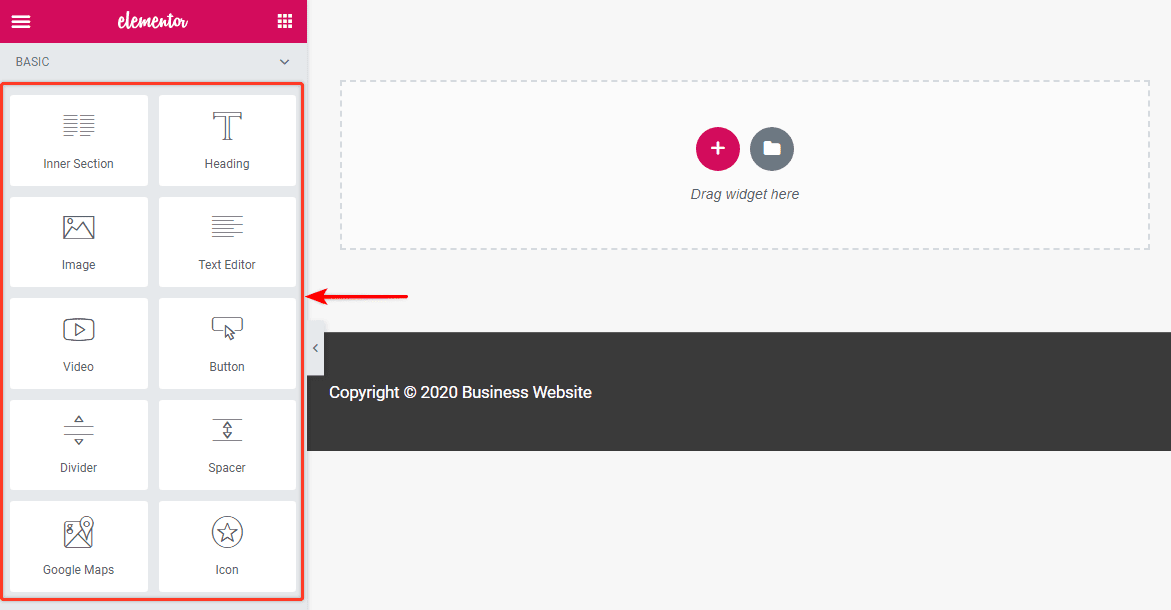
Elementor is a web builder for WordPress that allows you to transform your website into whatever you want it to be. The best thing about this is you do not have to switch to another theme to get a completely different look and layout. This web builder offers several benefits. These benefits include:
Ease of use: Elementor provides a very easy way to move around editing your website. If you are not very good at website editing or you do not know how to code then having the Elementor editor could be very convenient.
What you see is what you get: which means the version of the page you see in the Elementor interface is precisely what your visitors are going to see (unlike working with HTML and CSS, the old-school way). The pages are all mobile-responsive and SEO-friendly. Elementor is a WYSIWYG (What You See Is What You Get) editor. With the real-time preview, you get to see exactly how your page looks after an update, rather than publishing it and then having to redo if it didn’t turn out the way you wanted it to.
Extensive training opportunities: There is a big community surrounded Elementor and also a great source of free training and information for beginners and expert developers. You get to constantly learn and get exposed to new tools, design ideas, and so much more. Not to mention, the community is there to back you up if you need any help, suggestions, and ideas to build an awesome website.


Budget friendly: If you haven’t use the Elementor yet, then we would suggest trying the free version where you can perfectly build a website then when you need more functionality, go for the premium version .You can get Elementor Pro at attractive, flexible prices that start from $49.00 per year.

Responsiveness matters: With more than 50% of website traffic coming from mobile devices, it’s imperative that you get the mobile view of your website spot on. With Elementor, you can easily preview and customize your pages for desktop, mobile, and tablet devices. Simply switch the view and tweak every element to look perfect on any device.
Authority to customize every part of the theme: Elementor’Theme Builder lets you customize every fundamental part of your WordPress site without coding including your Header, Footer, Global Pages and Posts, Global Archives and WooCommerce Products and Product Archives.
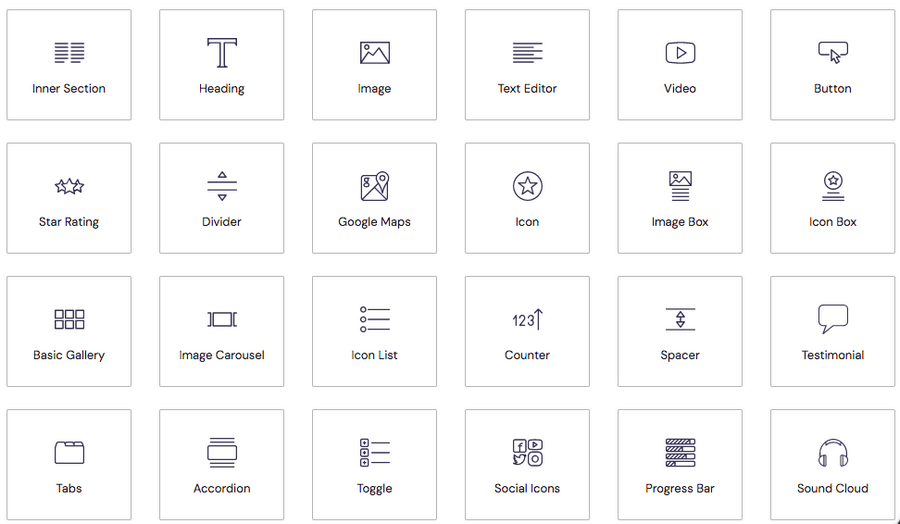
Access to professional templates and blocks: With 90+ incredible widgets (also referred to as blocks) and more than 300 designer templates, you can set your imagination wild while creating your web pages, landing pages, pop-ups, and more. From headlines to buttons, social media icons to galleries and carousels, there’s a widget for just about any feature you’d like to add to your website.

Does Elementor slow down your site? The short answer is, no it doesn’t. What slows down WordPress websites is poor hosting, inefficient images, slow themes, and using too many plugins.

Schedule a free consultation

If you are looking for someone you can trust and depend on for assistance and services, your search is over. Contact Us and Find out How our Virtual Assistant Team can help you !

Go back

Your message has been sent

Warning

Awesome checklist apps for Time Management

 Time management has grown into an empire of applications, software, and hardware all with the sole purpose of making sure every minute you spend at work is productive. Time management apps are tools and solutions that help you better organize and prioritize your tasks while using time effectively. Some of them help you in daily basis in :

-Task organizers

-Time trackers

-Planner platforms

-Scheduling platforms

-Calendar apps

-Project management organization

The main purpose of each app is to help you be more efficient at work , other to track and save time. There are countless apps and tools to choose for your needs that can help you spend every minute of your life in the most productive and meaningful way possible.

Let have a little review of this awesome apps that will help you to improve and save timer in your business.

Here are the best time management apps to help manage your life:

Evernote : Evernote is one of the most feature-rich and popular note taking apps , help you with keeping track your most important tasks. Evernote helps you capture and manage ideas of your team, projects, memories, and to-do lists, so nothing gets missed. Write notes, attach documents, scan images, take voice memos or clip from the web can be organized easily. Put in order everything from big projects to personal moments in a single place, accessible on your favorites devices such as computer, tablet, or phone. Also you can access offline. With Evernote, you can focus on what matters.

Below is a look at some of Evernote’s top features.

Price : Free Version with limited Features and Pay Plans. Premium plan for $7.99 and the Business plan for $14.99.

Toggl: Puts a timer into any web tool and allows quick real time productivity tracking with all the data stored. It offers multiple ways to track time, as well as other handy features like expense tracking and reporting. You can use Toggl via Mobile app (Android and iOS devices), Desktop app (Windows and Mac), Web app, Firefox and Chrome extension. Using Toggl, you will track the amount of time you are spending on emails, blog posts, client work, etc.

Time tracking with Toggl will allow you to take an objective look at your work week and spend more time on your most important business tasks. If you make a habit for using a time tracking tool like Toggl, you’ll have data and proof of how you’ve accounted for your time. 

Price: The starting price for a paid plan is $10/user per month for unlimited projects and clients.

Todoist: Todoist makes apps for all major devices and platforms, and it couldn’t be easier to use. There’s a free version, which is very good, though the Pro level is absolutely the way to go. If you need an app that will keep you productive with tools for organizing your tasks, either by yourself or in collaboration with others, Todoist is it. It’s a five-out-of-five stars Editors’ Choice winner.

Todoist helps segment large projects into multiple sub-projects or sub-tasks and categorize them using labels, filters or task priority levels. Users are able to create a new task, track the status of their ongoing tasks, and view all completed tasks within their Todoist account.

Price:  Free, Pro ($5 per month or $48 per year), and Business ($8 per person per month or $72 per person per year). 

Remember The Milk: It is the smart to-do app for busy people, it is a tried-and-true to-do-list app that lets you share tasks and lists with others, such as members of your household. The interface is clean and makes it easy to quickly generate new tasks and follow their progress .You can use it from anywhere and the animations for a completed tasks are satisfactory and motivating . It has an excellent (when it works) Gmail plugin, so you can manage your task from your email. There are also apps for your mobile device and tablet, and the UI of each is excellent. RTM makes managing your to-do list fun! With millions of users worldwide, this feature-packed app means that you’ll never forget the milk (or anything else) again.

Price: Remember The Milk will always have free accounts available. You can upgrade to a Pro account for only $25 for a year, and receive a bunch of extra benefits

When choosing a checklist app, consider your specific needs and what kind of projects you are working. All are available in the office or the field via desktop and mobile, the app offers all the functions business owners want in a checklist app. Choose your favorite and let’s get organize

Schedule a free consultation

If you are looking for someone you can trust and depend on for assistance and services, your search is over. Contact Us and Find out How our Virtual Assistant Team can help you !

Go back

Your message has been sent

Warning

Tips to Create Of Professional Email Signature That You Must Know

A good email signature is simple, informative, professional, and puts the information at the forefront. But, this doesn’t mean your signature has to look dull or boring. There are many ways to get the most out of your email signature design. A signature is the perfect opportunity to brand every message you send. It establishes and reinforces who you are as a company.

There are many ways to get the most out of your email signature design, so let’s run over few easy tips and look at some beautiful examples.

01. Include the most important information: Depending on what your email recipients might need to know, this could include information like your name, job title, phone number, or business address. By including only the most important pieces of information for the brand – the logo, email author’s name, job title, phone number , social media, website—this design is not only kept short and simple, but also very easily navigable.

Include your social media links

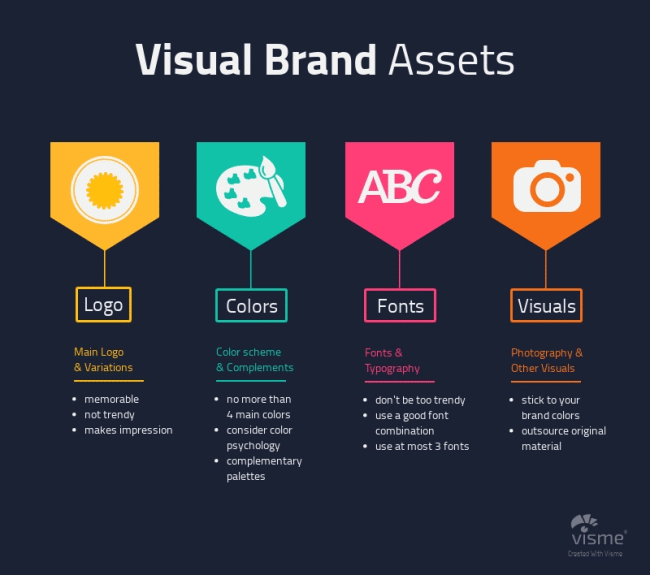
02. Branding: A signature is a perfect opportunity to brand every message you send. It establishes and reinforces who you are as a company. You can brand your signature through your logo, color scheme, and font elements. If you have any banners or other text in your signature, make sure it matches your brand voice.

Visual elements of branding. (Source: Rebrandly)

03. Keep Your font and color palette small:

A common reason for people using too many fonts and color is that they feel the need to highlight certain titles and pieces of information, for this it is better to use simple typeface that has a few weight and style options and just mix up your type size, weight and/or colors when needed instead of using different sizes and colors. Note that you must to play with the colors of your logo and get an armory between your signature and your branding colors.

Use your logo colors and fonts

04. Use a signature generator : Too much rules to follow , and sometime we are not expert in the matter so I recommend you to use a tool and create email signature with a generator, these are some of the best.

Today I Will recommend you Hubspot. It is best known as a CRM and suite of marketing tools. It also offers a free email signature generator.

Select from six different templates, fill out your information, and select your brand colors. If you have a custom image, like a logo, you can add that to your Hubspot signature, too. Hubspot branding is added by default but can be removed.

You can copy the signature or its source code to add to your email software.

Creating a professional email signature is easy. It really is. You don’t require additional resources or time to create it. However, the benefits you get for using an email signature are so huge that we are surprised why many businesses still don’t have a professional email signature. So, if you are among those businesses and want your brand to recognize, then go ahead and create it now!

Schedule a free consultation

If you are looking for someone you can trust and depend on for assistance and services, your search is over. Contact Us and Find out How our Virtual Assistant Team can help you !

Go back

Your message has been sent

Warning

Trello: A Fabulous Free Project Management Tool for You

Feeling time poor and overwhelmed? We know that feeling, its part and parcel of running a small business – but Trello can most certainly help with this. The problem is, where to start?  We will walk you through Trello, how best to use it to your advantage, showing you all about We’ve learned while using it to create a successful projects.

What’s Trello?

Trello is a collaboration tool that organizes your projects into boards. Simple (and fun) to use, Trello tracks what’s being worked on, who’s working on what, and what the status is of each and every task in your given project. Think of Trello as a whiteboard filled with rows of 80s neon sticky notes with each note as a task for you and your team only with a heck of a lot more functionality and adaptability. You can take this whiteboard with you on your mobile or tablet, and can access it from any computer via the web. Sharing a Trello board with other Trello users is easy and you can see real time updates from team members, and mention other users to notify them.

Easily organise work across all of your boards

Trello is great for companies or individuals who have a number of tasks running at once and who need to be able to track their progress. It puts the onus of completing tasks on the user and helps reduce the chance of “forgotten” assignments. One of the reasons so many companies have chosen to use it over other project management tools is the fact that it is streamlined in comparison to other software.

Part of the reason Trello has caught on so quickly is that it can also be used for pretty much any type of project. Whether you need to create a personal to-do list, manage tasks for an upcoming wedding, or run an editorial calendar, Trello is simple enough for day-to-day use as well.

Cost

  • ​Trello is free by default
  • For extra features, upgrade to a Trello pricing plan for a monthly cost

How to get started

  • ​Sign up for an account at the Trello website
  • Create a board or ask a board owner to send you an invitation to join theirs
  • Search ‘Trello’ on the App Store (iOS) or Google Play (Android) to download the mobile app
  • Use the Trello help centre.
  • Check samples: This sample Trello board for project management uses the simple tips and tricks we outlined for you
Trello for Nonprofits
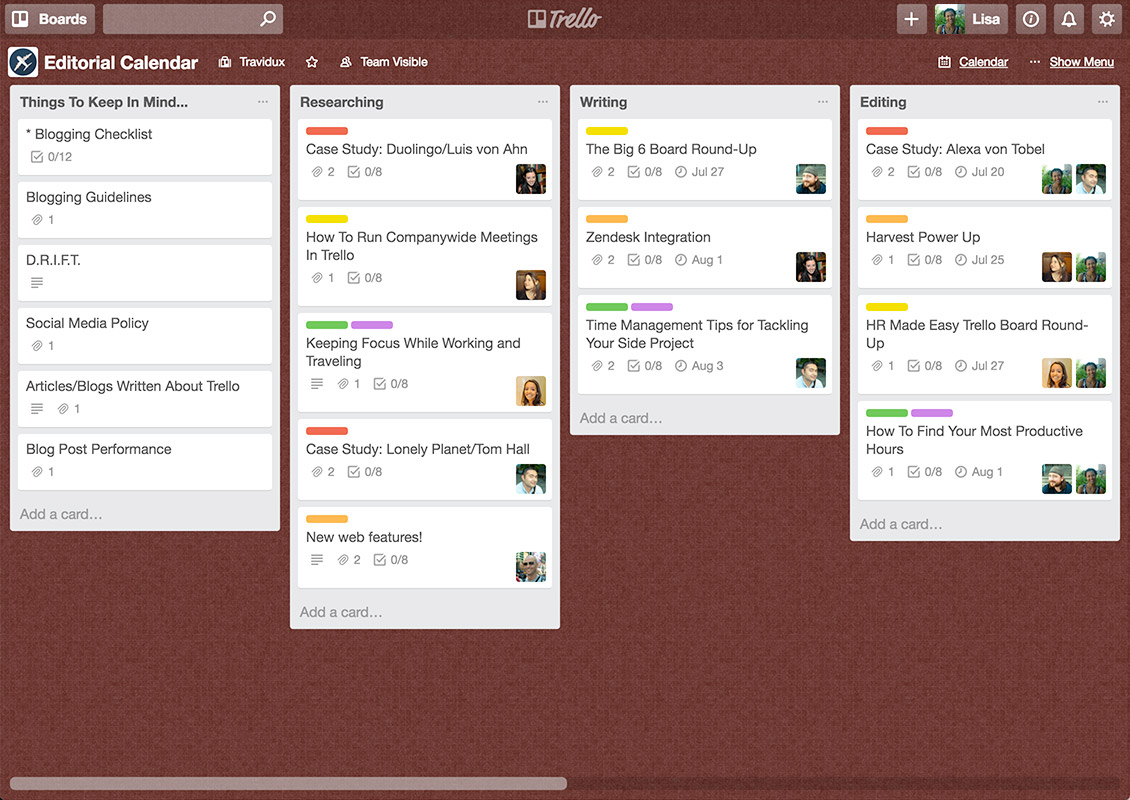
A board looks like this

What you can do with Trello

Create and Organize To-Do List 

One of the best ways to stay organized is with a to-do list. A simple “To Do,” “Doing,” and “Done” workflow will transform how much you accomplish each and every day and week. 

Based on Kanban principles, Trello has three major lists: To-Do, Doing, Done.

To-Do: on this list, we place all tasks we need to complete. The cards are arranged in order of priority — the most important are at the top, the least — at the bottom.

Doing: this list shows what tasks are currently in work. In this part of the board, cards can be sorted by the date they were created or alphabetically.

Done: when a task is completed, it is placed in this list. You always can return a card to the other list by pulling it to the left or the right side.

Split your work into very specific lists so nothing falls through the cracks and use the reference list to keep important information on hand. You can either manage your To-Do-List from your mobile.

Project Management

With Trello, you can keep projects organized from start to finish, track progress, and ensure that nothing slips through the cracks. Whether it’s a simple to-do list or a complex workflow, Trello is customizable to the demands of any project. 

Trello is a streamlined project management solution that leans heavily into its collaboration setup. While this tool’s features are simple by nature, this platform offers many useful features that’ll make your life as a project manager or team member much easier. These are the top five features offered by Trello.

Trello is a great way for your company to organize projects while accommodating team members with different schedules and locations. Furthermore, it is a great way for any staff person or freelancer to organize their own tasks and ensure they stay on top of intermediary steps and deadlines. With Trello, information won’t get lost, you can store all files relevant to your project, and you can communicate effectively with your team. And, it’s free!

Get control of your business by trying Trello. The best part is that you can use Trello for things other than project management. It’s free, fun and highly customizable, so please do check it out.

Schedule a free consultation

If you are looking for someone you can trust and depend on for assistance and services, your search is over. Contact Us and Find out How our Virtual Assistant Team can help you !

Go back

Your message has been sent

Warning

Your social media manager

Do you ever see things on social media and wonder what they are?
Do hashtags confuse you?
Do younger members of the family think you’re embarrassing based on your social media use?

Social media literacy is a no-brainer. At the very least, you should know Facebook, Twitter and Instagram like the back of your hand. You also need to understand how each platform differs so you can maximize them all . Staying up to date on these knowledge requires a subject matter expert to perform your goals in your social media accounts, to make sure that the brands have success in social media platforms, that’s why you need to have a social media manager.

An expert social media manager does a lot more than post, experts tell us. SMMs are creative strategists, storytellers, editors, community-builders and more — and they can level up your brand’s online presence.
Would be glad to help you managing your online presence!

Together we can do:
1. Increase brand awareness.
2. Humanize your brand.
3. Establish your business as a thought leader.
4. Create the social media content for your pages.
5. Increase website traffic.
6. Promote content.
7. Unique social media designs.

Promoting your content is a great way to get your smart, well-researched content in front of new people, proving your expertise and growing your audience.

You can choose between my packages to find the one for you.

We offer:

  • Daily Posts and Engagement
  • Branded photos
  • Best hashtags
  • Organic users
  • Post scheduling

We can manage and optimize your  accounts in:
– Facebook
– Instagram- Twitter
– Linkedin- Pinterest- YouTube- Google+

Contact me and together we can make the best for your business!

Schedule a free consultation

If you are looking for someone you can trust and depend on for assistance and services, your search is over. Contact Us and Find out How our Virtual Assistant Team can help you !

Go back

Your message has been sent

Warning

Free Social Media Management Tools to Make Your Life Easier

Organization is one of the keys to success in marketing, so if you are managing your social platforms , the best cheap and easy way is using a social media management tool and it will make your life substantially easier. Social management platforms will help you manage multiple social profiles in one place, schedule posts in advance, run contests, track analytics across platforms, and the list goes on. These tools really are game changers for your social strategy.

 I’ve rounded up a list of the seven best free social media management tools to incorporate into your 2021 strategy, starting with my personal favorite, Buffer!

Buffer

One of the best apps for managing your social media presence and scheduling your posts. The app also comes with analytics tools that enable you to track your audience’s activity and figure out when it is the best time to post in the future. We especially love its Chrome extension, which integrates itself seamlessly and never gets in the way, yet it is always there when you need it. It is a more straightforward and more effective way of managing your social media, and you are never more than a few clicks away from setting up anything you want. Buffer supports over 7 different platforms – you can add up to 4 on the free plan.

Canva

Social media is increasingly becoming more and more visual. Canva is an excellent tool for anyone managing social media accounts to use. You can create designer-level marketing assets using any of the thousands of ready-made designs they have available to you. Now, you can even connect your social channels and publish or schedule directly from Canva. They have a free version available, which gives you decent access to great pre-made templates. The pro plan gives you access to all of the templates for only $12.95/month.

Tweetdeck

Tweetdeck is the go-to social media management tool for those who focus on Twitter. It is ideal for any brand that mostly uses Twitter in its social media marketing page. 

You can use the tool to manage and monitor an unlimited number of Twitter accounts, all from a single integrated interface. You also get access to a customisable social media dashboard that lets you send and receive Tweets with ease. 

This platform includes numerous free tools and functions, including the ability to schedule Tweets. You can also use a custom timeline, make team accounts, and manage your Twitter lists. 

Socialoomph

As you look at Socialoomph, keep in mind that compared to the other tools on our list, this one has more of an old-school interface. This tool supports Twitter, Facebook, Pinterest, Discord, LinkedIn, Reddit, StockTwits, Mastodon, Shopify, Tumblr, WordPress.org, and WordPress.com. 

The free plan (Personal Suite) works with a single social media profile. You can use it to schedule unlimited posts to that profile, as long as you don’t exceed three posts in each hour. This makes it particularly useful for businesses that just need a social media management tool for a single social media channel. You can use it to queue your entire month of posts ahead of time. There is also a blog posting feature that lets you queue your blog posts, then publicize them on your social media channels in a separate queue. You can even track keywords. 

Later

Later is a scheduling app for Instagram, Facebook, Twitter, and Pinterest, with one small catch: it’s only for posting images and other visual content. What sets it apart from many of the other social media scheduling apps is that Later has a free forever plan that’s robust enough for a lot of small businesses.

Later counts one Instagram account, Facebook Page, Twitter account, and Pinterest account as a “social set.” On the free plan, you get one social set with 30 scheduled posts per social profile, and a single user.

Which social media management tool is best for you?

Using one or more of the above free social media management tools will help you make the most of your time, plan social media campaigns ahead of time, and view analyses. 

Learn how you can combine them with your overarching marketing strategy with help from MyCostaRicaVirtual. Talk to us by dropping an email at info@mycostaricavirtual.com for a free consultation today.

Schedule a free consultation

If you are looking for someone you can trust and depend on for assistance and services, your search is over. Contact Us and Find out How our Virtual Assistant Team can help you !

Go back

Your message has been sent

Warning

What does a social media virtual assistant do?

A social media virtual assistant (or remote social media manager) contributes to marketing strategy by harnessing the power of social media to locate and attract clients. Therefore, as an entrepreneur, you need to ensure that your business has a robust social media presence to create brand awareness, generate leads and answer customer questions. However, maintaining an active social media presence takes a lot of time. Social media virtual assistants will take away all the social media related tasks from your plate. Here is a deeper look into why you need a VA:


The Essential Roles and Responsibilities of Your Social Media Team

  • Creating and updating social media pages for your business

A social media virtual assistant (VA) is someone who creates, schedules, manages, and monitors content posted to social media platforms. For example: Facebook, Instagram, Twitter, YouTube and/or Pinterest. Depending on the business size and industry/niche, a social media VA can be focused on one or more social media platforms for a client. The position’s main goal is to take over the responsibility of keeping up the brand on social media all while implementing the business owner’s social media marketing strategies.

  • Creating content for social media accounts

The main way that you as a business owner can keep your social media active is by constantly sharing content that is relevant and useful to your audience. Content creation requires a lot of effort and creativity making it a very time consuming task. Given how content-driven social media is, it’s important to regularly put out valuable content to constantly engage the audience. Generating the right content after thorough research is a task a social media virtual assistant is adept at handling. Your VA will create content, schedule it, and post it on different channels.

  • Creating social media graphics

Eye-catching graphics can help you communicate better with your audience. When used correctly, great graphics can help increase post engagement. These graphics can be in the form of social media posts such as Instagram posts, banners and cover photos for different platforms and infographics. Creating great graphics requires your full attention and it will therefore take a lot of time if you’re doing it without any help. A social media virtual assistant will create all the social media graphics that you need for your business accounts.

  • Scheduling posts

Hire a social media virtual assistant to create weekly and monthly planners for social media posts and status updates. Regularly posting content will go a long way in keeping your audience interested. Your VA will prepare calendars, prepare/gather content, and manage all posts. Social media virtual assistants have vast knowledge and skills in using different planning and scheduling tools like Planoly, Hootsuite, Buffer, Facebook Creator Studio among others

  • Keeping track of social media trends

Being on social media means you have to be active throughout to catch new trends. However, as a business owner, you have other important tasks to attend to that can prevent you from being up to date with the latest trends. Knowing  what is happening is important as it helps you tailor your content in that direction, reaching more people and creating more brand awareness. A social media virtual assistant comes in handy here since they spend most of their time on social media and are therefore always up to date with the latest trends.

  • Engaging with followers and monitoring interactions

Just one angry comment on a Facebook post can be dangerous for your PR. Hire a social media virtual assistant to monitor comments and replies and respond to them on time. This involves responding to comments, answering questions and addressing complaints. A social media virtual assistant ensures that they respond to customers and prospects. Fast and accurate responses results in happy customers and helps generate leads.

  • Analyzing statistics and reports to see what converts best.

You can’t improve what you don’t measure. That is why it is important for you to analyze the performance of your social media posts. This will help you see what type of social media content had the highest engagement and then you can create similar content. A social media virtual assistant will analyze the performance of your social media platforms and share with you a report that can help your business improve its social media presence.

Your audience and potential customers don’t sleep and if they are not talking about you they are talking with your competitors. It is important to ensure you are engaging with them even though you have other tasks to take care of, driving forward your business. 

By hiring a social media virtual assistant you can ensure your social media is maintained and grows your business whilst you do what you do best.

And best of all you can save money as opposed to employing someone directly. You get to choose how many hours you want your assistant to work according to your budget.

Schedule a free consultation

If you are looking for someone you can trust and depend on for assistance and services, your search is over. Contact Us and Find out How our Virtual Assistant Team can help you !

Go back

Your message has been sent

Warning